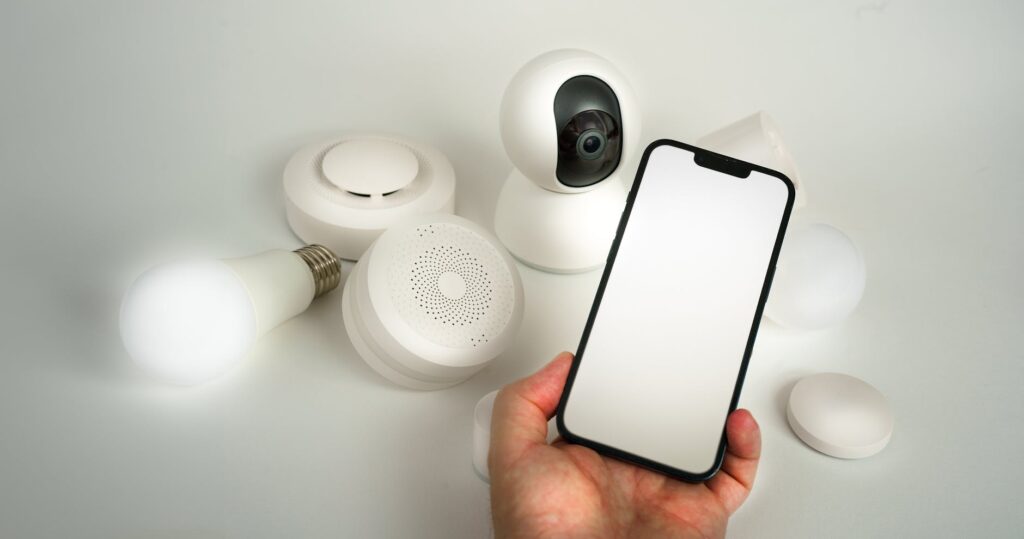
The Ultimate Guide to Smart Home Security Systems in 2026
Navigating the world of smart home security in 2026 can feel overwhelming, with new devices and features emerging constantly. From advanced AI-powered cameras to smooth integration with your existing smart home ecosystem, staying ahead of potential threats is easier than ever. This complete guide will walk you through everything you need to know to build a strong and reliable smart home security system tailored to your needs.
Last updated: May 6, 2026
Key Takeaways
- Smart home security offers enhanced protection through connected devices like cameras, sensors, and smart locks.
- Integration with other smart home tech (voice assistants, lighting) adds convenience and layers of security.
- Key features to consider include video quality, motion detection, two-way audio, remote access, and battery backup.
- DIY systems offer flexibility and lower upfront costs, while professionally monitored systems provide round-the-clock support.
- Cybersecurity is crucial; always choose systems with strong encryption and regular software updates.
Why Invest in Smart Home Security in 2026?
The primary benefit of a smart home security system is its ability to deter intruders and provide real-time alerts. Beyond basic alarm functions, these systems offer proactive monitoring and control. For instance, a smart camera can send a notification to your phone if it detects motion outside your door, allowing you to view a live feed and even speak to the visitor remotely. This level of awareness and control is a significant upgrade from traditional security measures.
According to a recent survey by the Consumer Technology Association (CTA) as of early 2026, over 40% of households report using at least one smart security device. This growing adoption reflects a desire for greater peace of mind and convenience. The interconnected nature of these systems also allows for sophisticated automation, such as lights turning on when motion is detected after dark, further deterring potential threats.
Essential Components of a Smart Home Security System
A complete smart home security setup typically includes several key components, each serving a distinct purpose in protecting your property and loved ones. Understanding these elements is the first step in designing your ideal system.
Smart Cameras
These are the eyes of your security system. Modern smart cameras offer high-definition video, night vision, wide-angle lenses, and motion detection. Many also feature two-way audio, allowing you to communicate with visitors or even warn off potential intruders. As of May 2026, cameras with AI-powered person detection, distinguishing between pets, vehicles, and actual people, are becoming standard in mid-to-high-end models.
Example: The Nest Cam (3rd Gen) offers 1080p HDR video, intelligent alerts, and a 3-hour cloud recording history for free, with optional continuous recording plans. For more advanced needs, systems like the Relink E1 Outdoor offer 5MP resolution and advanced AI detection.
Smart Locks
Smart locks provide keyless entry and remote locking/unlocking capabilities. You can grant temporary access to guests or service providers via a smartphone app, eliminating the need for physical keys. Many smart locks also log entry and exit times, offering an audit trail of who accessed your home and when. Some models integrate fingerprint scanners for added security.
Example: The August Wi-Fi Smart Lock easily retrofits onto most existing deadbolts, allowing you to control your door from anywhere. Schlage Encode Smart Wi-Fi Deadbolt offers built-in Wi-Fi, eliminating the need for a separate hub.
Smart Sensors
These devices detect various environmental changes or intrusions. Common types include door/window sensors (detecting when an opening is breached), motion sensors (identifying movement within a space), glass break sensors (listening for the sound of breaking glass), and environmental sensors (like smoke, carbon monoxide, or water leak detectors). Integrated smart sensors provide an early warning system for a wide range of potential hazards.
Example: Wyze Sense Hub uses a variety of sensors, including contact sensors for doors and windows and motion sensors, all communicating wirelessly to a central hub that can trigger alarms or send notifications.
Video Doorbells
Video doorbells combine a doorbell with a camera, allowing you to see, hear, and speak to visitors at your front door from your smartphone, whether you’re home or away. Many offer motion detection zones and package detection, alerting you when someone is approaching or when a delivery arrives.
Example: Ring Video Doorbell Pro 2 offers 1536p HD+ Video, a 150-degree field of view, and advanced motion detection, providing a clear view of your doorstep day or night.
DIY vs. Professionally Monitored Systems
Choosing between a DIY and a professionally monitored system is a key decision. Each approach has its own advantages and disadvantages, catering to different user needs and preferences.
DIY Smart Home Security Systems
DIY systems, like those offered by SimpliSafe or Ring Alarm, are designed for easy self-installation. You typically purchase the components online or from a retailer and set them up yourself using app-guided instructions. This often leads to lower upfront costs and greater flexibility in choosing and expanding your system.
Pros: Lower initial cost, flexible component selection, no long-term contracts required, easy to move if you relocate.
Cons: Requires user to monitor alerts and respond to events, self-troubleshooting, potentially less strong support in emergencies.
Professionally Monitored Systems
Companies like ADT or Vi vint offer systems that are installed and monitored by their professional teams. When an alarm is triggered, the monitoring center is alerted and can dispatch emergency services if necessary. These systems often come with a monthly fee but provide a higher level of security and response.
Pros: 24/7 professional monitoring, faster emergency response, professional installation and support, often integrated with other home services.
Cons: Higher monthly fees, long-term contracts can be restrictive, less flexibility in choosing components.
The choice often boils down to your budget, technical comfort level, and desired level of security oversight. Many DIY systems now offer optional professional monitoring plans, blurring the lines between the two.
Key Features to Look For in 2026
As of May 2026, several features are becoming standard or highly desirable for smart home security systems. Prioritizing these can ensure you get the most effective and convenient protection.
Video Quality and Night Vision
Clear video footage is crucial for identifying events and individuals. Look for cameras offering at least 1080p resolution, with many premium options now providing 2K or 4K clarity. Effective night vision, using infrared (IR) LEDs, is essential for round-the-clock surveillance. Color night vision, which uses ambient light to produce color images in low light, is a notable advancement.
Motion Detection and Alerts
Advanced motion detection is key to reducing false alarms. Look for systems that offer customizable motion zones, so you only receive alerts for specific areas. AI-powered person detection, as seen in systems from Google Nest and Eufy, can differentiate between people, animals, and vehicles, significantly improving alert accuracy. Instant mobile notifications are vital for timely awareness.
Two-Way Audio
The ability to speak and listen through your cameras or video doorbell is incredibly useful. It allows you to greet guests, instruct delivery drivers, or verbally challenge suspicious individuals. Ensure the audio quality is clear and that there’s minimal delay.
Remote Access and Control
Your entire system should be controllable via a smartphone app. This includes viewing live camera feeds, arming/disarming the system, checking sensor status, and unlocking doors. Reliable cloud storage for video recordings, with easy retrieval options, is also a major plus.
Power Backup and Connectivity
What happens during a power outage or internet disruption? Look for systems with battery backup for essential components, especially the main hub and cameras. For connectivity, Wi-Fi is standard, but some systems offer cellular backup for continuous monitoring even if your home internet goes down. According to research from security experts, cellular backup is a critical feature for high-security needs.
Cybersecurity: Protecting Your Smart Home
The interconnected nature of smart home devices also presents cybersecurity risks. A compromised smart lock or camera could grant unauthorized access to your home or personal data.
Strong Passwords and Encryption
Always use strong, unique passwords for your Wi-Fi network and all smart home device accounts. Enable two-factor authentication (2FA) wherever possible. Ensure your smart home system uses strong encryption protocols (like WPA2 or WPA3 for Wi-Fi) to protect data transmission.
Regular Software Updates
Manufacturers regularly release software updates to patch security vulnerabilities. Keep your router firmware and all smart device apps and firmware up-to-date. Many systems offer automatic updates, which are highly recommended.
Network Segmentation
For the tech-savvy, consider setting up a separate Wi-Fi network (SSID) exclusively for your smart home devices. This isolates them from your main network, limiting the potential damage if a smart device is compromised. This is a more advanced step but offers significant security benefits, as highlighted by cybersecurity firms like Malwarebytes.
Integrating Security with Your Smart Home Ecosystem
The true power of smart home security often lies in its integration with other smart devices. The Ultimate Guide to Smart Home Security Systems in 2026 allows for more automated and responsive security protocols.
Scenario: Imagine a smart smoke detector sensing smoke. It can instantly trigger your smart lights to flash red, unlock your smart locks to facilitate escape, and send alerts to your phone and a monitoring center. Similarly, when you arm your security system for the night, it can automatically turn off all connected lights and close smart blinds.
Voice assistants like Amazon Alexa and Google Assistant are central to this integration. You can ask them to arm your system, check camera feeds, or lock doors (though locking doors via voice command often requires an extra security step or PIN for safety). Ensure compatibility between your chosen security system and your voice assistant platform.
discussions dig deeper into smart home automation possibilities.
Common Mistakes to Avoid
Even with the best technology, user error can undermine security effectiveness. Being aware of common pitfalls can help you avoid them.
- Ignoring Software Updates: Outdated firmware is a primary vulnerability. Always update devices promptly.
- Weak Wi-Fi Security: If your home Wi-Fi is insecure, your smart security system is too. Use WPA2/WPA3 encryption and a strong password.
- Over-Reliance on One Device: A single camera isn’t a complete system. Layer multiple types of devices (cameras, sensors, locks) for complete coverage.
- Poor Camera Placement: Ensure cameras have a clear, unobstructed view of the areas you want to monitor. Avoid pointing them directly at bright lights or windows that can cause glare.
- Not Testing the System: Regularly test your alarm, sensors, and notifications to ensure everything is working correctly.
Frequently Asked Questions
What is the average cost of a smart home security system in 2026?
As of May 2026, the cost varies widely. DIY systems can range from $200-$600 for a basic starter kit, with additional sensors costing $20-$50 each. Professionally installed and monitored systems often have higher upfront equipment costs ($500-$1500+) plus monthly fees of $30-$60.
Can I use a smart home security system without a Wi-Fi connection?
Most smart home security systems rely heavily on Wi-Fi for communication and remote access. Some systems offer cellular backup as an alternative or supplement, especially for professional monitoring, but a stable internet connection is generally essential for full functionality.
Are smart home security systems reliable during power outages?
Many systems include battery backup for critical components like the hub and cellular modem. However, the duration and effectiveness depend on the specific system’s battery life and the components included. Cameras may operate on battery power for a limited time or cease functioning without external power.
What are the privacy concerns with smart home security cameras?
Privacy is a concern due to the potential for unauthorized access to live feeds or recordings. Choosing systems with strong encryption, reputable manufacturers, and features like local storage options can mitigate these risks. Be mindful of where cameras are pointed, especially within your home.
How do I choose between different brands like Ring, Google Nest, or SimpliSafe?
Consider your budget, desired features (e.g., camera resolution, smart lock integration), and whether you prefer DIY or professional installation and monitoring. Read reviews, check compatibility with your existing smart home devices, and look at ongoing subscription costs.
Is smart home security susceptible to hacking?
Yes, like any connected device, smart home security systems can be vulnerable to hacking. However, manufacturers are continuously improving security measures. Following best practices like strong passwords, 2FA, and regular updates significantly reduces the risk of compromise. According to recent cybersecurity reports, the vast majority of breaches stem from weak user credentials.
Conclusion: Securing Your Future
Implementing a smart home security system in 2026 is a strategic investment in peace of mind. By understanding the available technologies, carefully choosing components, prioritizing cybersecurity, and considering integration with your existing smart home, you can create a strong defense tailored to your specific needs. Start by assessing your biggest security concerns and budget, then explore the options that best align with your lifestyle.
Last reviewed: May 2026. Information current as of publication; pricing and product details may change.
Editorial Note: This article was researched and written by the Bloxtra editorial team. We fact-check our content and update it regularly. For questions or corrections, contact us.