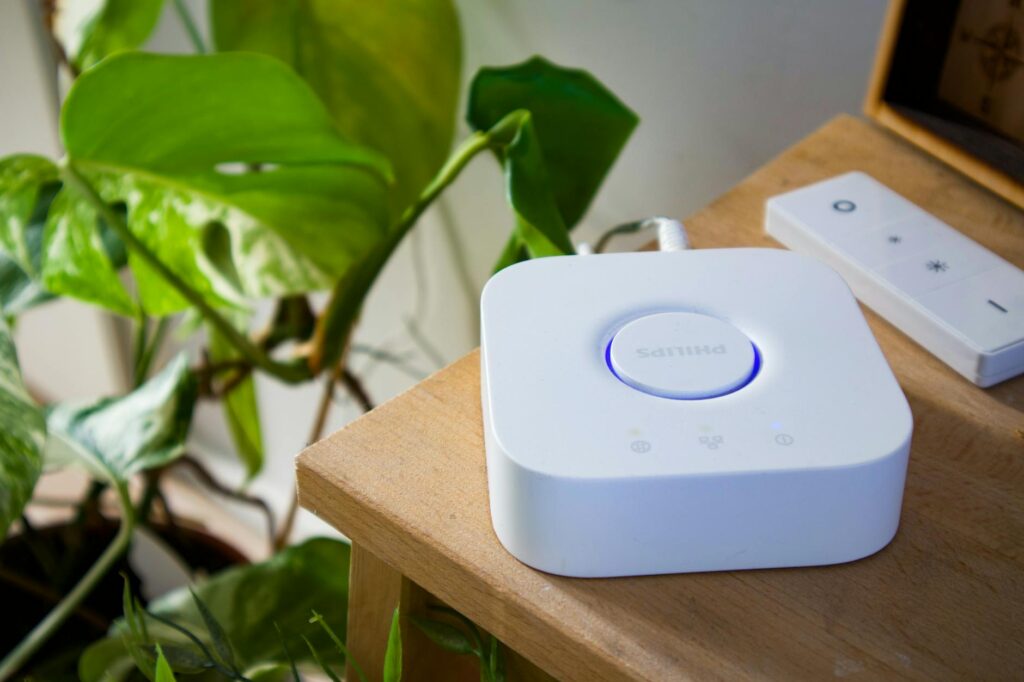
Why Your Smart Home Feels So Dumb (And How to Fix It)
This guide covers everything about Top Smart Home Hubs for Smooth Device Integration. You bought the smart bulbs, the smart thermostat, the smart lock, and maybe even a smart coffee maker. Yet, getting them to all talk to each other feels less like a futuristic utopia and more like a digital Tower of Babel. If your smart home devises are playing hard to get with each other, you’re likely missing a crucial piece of the puzzle: a capable smart home hub. As of May 2026, the market is packed with options, but not all hubs are created equal when it comes to true smooth device integration. This guide will help you cut through the noise and find a hub that actually makes your connected life simpler.
Key Takeaways
- A smart home hub acts as a central brain, enabling devices from different brands and communication protocols to work together.
- Consider your existing devices and their communication protocols (Wi-Fi, Zigbee, Z-Wave, Thread, Matter) when choosing a hub.
- Major contenders in 2026 include Amazon Echo (with built-in hub), Google Nest Hub, Apple HomePod, and dedicated hubs like Habitat Elevation and Samsung SmartThings.
- The Matter standard is improving interoperability, but a strong hub is still essential for complex automations and older devices.
- Prioritize ease of setup, app interface quality, and local control capabilities for a truly smooth experience.
The Central Brain: What Exactly is a Smart Home Hub?
Think of a smart home hub as the conductor of an orchestra. Without a conductor, each instrument might play beautifully on its own, but the overall performance is chaotic. A hub brings order, translating commands and data between devices that might otherwise speak entirely different languages. It connects to your home network (usually via Wi-Fi or Ethernet) and then communicates with your smart devices using their native protocols.
This is crucial because not all smart devices communicate the same way. Some use Wi-Fi, others use low-power radio frequencies like Zigbee or Z-Wave, and newer devices are adopting Thread or the overarching Matter standard. A good hub understands these different dialects, allowing your Philips Hue lights to dim when your Nest thermostat detects you’ve left home, for instance.
Decoding the Protocols: Your Devices’ Secret Language
To achieve smooth integration, you first need to understand what your smart devices are using to talk to each other. The most common protocols you’ll encounter are:
- Wi-Fi: Ubiquitous and fast, but can consume more power and bog down your router if you have too many devices.
- Zigbee: Low-power, mesh networking protocol ideal for sensors, lights, and switches. Requires a Zigbee-compatible hub.
- Z-Wave: Another low-power mesh protocol, often used for security devices like locks and sensors. Operates on a different radio frequency than Zigbee, avoiding interference. Also requires a Z-Wave-compatible hub.
- Thread: A newer, low-power, IP-based mesh networking protocol designed for reliability and security. It’s a key component of the Matter standard.
- Matter: This is an emerging connectivity standard aiming to unify smart home devices. It’s built on IP-based protocols like Thread and Wi-Fi, and aims to make devices from different manufacturers work together. As of 2026, Matter adoption is growing rapidly, but full compatibility still relies on a Matter-compatible hub or border router.
A hub that supports a wide range of these protocols, especially Zigbee, Z-Wave, and Matter, will offer the broadest compatibility for your existing and future smart gadgets. For example, a smart home hub that supports both Zigbee and Z-Wave can directly control devices using either of those protocols without needing separate dongles or bridges for each.
Top Smart Home Hubs for smooth Device Integration in 2026
When selecting a hub, consider your current ecosystem, your technical comfort level, and what you want your smart home to do. Here are some of the top contenders:
1. Amazon Echo Devices (with Built-in Hub)
Many Amazon Echo devices, particularly the Echo Plus, Echo Show (2nd Gen and later), and Echo Studio, have a built-in Zigbee hub. This means they can directly control Zigbee-based devices like Philips Hue bulbs or certain door sensors without needing a separate bridge. They also integrate seamlessly with Alexa voice commands and the broader Amazon ecosystem.
Practical Tip: While convenient, the built-in Zigbee hub can sometimes be less strong or offer fewer advanced configuration options than dedicated hubs. For complex automation, you might still need more. According to Amazon, many Echo devices also act as Thread border routers, enhancing Matter compatibility.
2. Google Nest Hub Devices
Google’s Nest Hub devices (like the Nest Hub Max and the newer Nest Hub 2nd Gen) have evolved to support Thread and act as Matter controllers. This means they can directly manage Thread-enabled devices and Matter-certified devices, offering a more unified experience within the Google Home ecosystem. Integration with Google Assistant is, of course, a major plus.
Drawback: Unlike some Amazon Echo devices, most Nest Hubs don’t have built-in Zigbee or Z-Wave radios. You’ll still need bridges for those older devices, though Matter support is simplifying things for newer gadgets.
3. Apple HomePod (2nd Gen) and HomePod Mini
For those deeply invested in the Apple ecosystem, the HomePod (2nd Gen) and HomePod Mini serve as excellent Thread border routers and Matter controllers. They integrate beautifully with Apple HomeKit, allowing you to control compatible devices using Siri and the Home app. HomeKit Secure Video also enhances smart home security.
4. Habitat Elevation
Habitat is a powerhouse for the enthusiast who wants granular control and local processing. It boasts built-in Zigbee and Z-Wave radios, and it’s a Matter controller. Crucially, Habitat processes most automations locally, meaning your smart home can still function even if your internet connection goes down. This is a significant advantage for reliability.
Drawback: Habitat has a steeper learning curve than consumer-friendly options like Echo or Nest. Its interface is more technical, and setting up complex automations requires more effort. It doesn’t have a built-in voice assistant like Alexa or Google Assistant.
5. Samsung SmartThings Hub
Samsung’s SmartThings platform, often accessed via a SmartThings-compatible device or the SmartThings Hub itself, is known for its broad compatibility. It supports Zigbee, Z-Wave, Wi-Fi, and is a Matter controller. SmartThings offers a strong app with extensive automation possibilities and integrates well with Samsung appliances.
Unique Angle: As of early 2026, Samsung has been actively expanding SmartThings’ interoperability, including efforts with IKEA’s Matter devices. This suggests a commitment to keeping the platform at the forefront of smart home integration trends. The platform’s strength lies in its ability to bridge older protocols with newer standards like Matter.
Building Your Integrated Smart Home: A Step-by-Step Approach
Choosing a hub is just the first step. Here’s how to build a truly integrated smart home:
- Assess Your Current Devices: Before buying a hub, identify the communication protocols of your existing smart devices. Check their packaging or manuals for Zigbee, Z-Wave, Wi-Fi, or Matter certification.
- Choose Your Hub Wisely: Based on your device assessment, select a hub that supports the majority of your current protocols and your preferred voice assistant (Alexa, Google Assistant, Siri). For future-proofing, prioritize Matter and Thread support.
- Set Up Your Hub: Follow the manufacturer’s instructions carefully. This usually involves connecting the hub to your router and downloading a companion app to your smartphone or tablet.
- Add Your Devices: Use the hub’s app to discover and add your smart devices. This process varies by device and hub, but often involves putting the device in pairing mode.
- Create Automations: This is where the magic happens! Use the hub’s app or voice commands to set up routines. For example, “Good Morning” could turn on lights, adjust the thermostat, and start your smart speaker playing the news.
Common Mistakes That Kill Smart Home Integration
Many users stumble when trying to connect their smart devices. Here are a few common pitfalls to avoid:
1. Ignoring Protocol Compatibility
Buying a hub that doesn’t support your devices’ core protocols is the most common mistake. A WI-Fi-only hub won’t talk to your Zigbee lights unless you add a separate Zigbee bridge, defeating the purpose of a central hub.
Solution: Always check the hub’s specifications for supported protocols (Zigbee, Z-Wave, Thread, Matter, Wi-Fi, Bluetooth). Prioritize hubs with broader native support.
2. Over-Reliance on Wi-Fi
While convenient, too many Wi-Fi devices can overwhelm your home network, leading to sluggish performance and connection drops for all your smart gadgets. Your router might not be designed to handle dozens of simultaneous Wi-Fi connections from smart devices.
Solution: Opt for hubs that support low-power protocols like Zigbee, Z-Wave, or Thread for devices like sensors and lights. These offload traffic from your Wi-Fi network.
3. Neglecting Local Control
Some hubs rely entirely on cloud processing. If your internet goes out, your smart home automations stop working. For critical functions like security or basic lighting, this is unacceptable.
Solution: Look for hubs that offer local control, such as Habitat Elevation or advanced configurations of Samsung SmartThings. These hubs can run automations directly on the device, ensuring functionality even without internet.
Expert Tips for a Truly Connected Home
Beyond the basics, here are some advanced tips to maximize your smart home integration:
- Embrace the Matter Standard: As Matter matures in 2026, it’s the most promising path to universal compatibility. Look for hubs and devices with the Matter logo.
- Use Routines and Scenes Effectively: Don’t just automate individual devices; create scenes (e.g., “Movie Night” dims lights, lowers blinds) and routines that trigger multiple actions based on time, presence, or sensor input.
- Consider a Dedicated Hub for Complexity: While smart speakers with built-in hubs are convenient, for advanced users or those with many diverse devices, a dedicated hub like Habitat or SmartThings offers more power and flexibility.
- Keep Firmware Updated: Manufacturers regularly release updates to improve device compatibility and security. Regularly check for and install firmware updates for your hub and connected devices. According to CNET (2025), firmware updates are critical for long-term device health and security.
Frequently Asked Questions
Are smart home hubs still relevant in 2026?
Yes, smart home hubs are more relevant than ever. While some devices connect directly via Wi-Fi, hubs consolidate control, enable complex automations between different brands, and support low-power protocols like Zigbee and Z-Wave, which are essential for many smart home devices.
What is the difference between a smart home hub and a voice assistant like Alexa?
A voice assistant (like Alexa or Google Assistant) is an interface for controlling devices and accessing information. A smart home hub is the underlying technology that enables different devices to communicate with each other and with the voice assistant. Many smart speakers now include basic hub functionality.
Which smart home hub is best for beginners?
For ease of use and broad compatibility with voice control, Amazon Echo devices with built-in Zigbee hubs or Google Nest Hubs (with Matter/Thread support) are excellent starting points. They offer straightforward setup and good integration with their respective ecosystems.
Does the Matter standard make smart home hubs obsolete?
No, Matter enhances interoperability but doesn’t replace hubs entirely. It simplifies how devices communicate, but a hub is still needed for managing devices, running advanced local automations, and integrating older Zigbee/Z-Wave devices that aren’t Matter-certified.
How much do smart home hubs typically cost in 2026?
Prices vary widely. Smart speakers with built-in hub capabilities can range from $50 to $200. Dedicated hubs like Habitat Elevation or Samsung SmartThings Hub typically fall between $80 and $150, offering more advanced features and protocol support.
What are the advantages of local control versus cloud control for smart home hubs?
Local control means automations run directly on the hub, ensuring they work even if your internet is down and offering faster response times. Cloud control relies on an internet connection, making it vulnerable to outages but potentially offering more processing power and remote access features.
Making Your Smart Home Truly Smart
Choosing the right smart home hub is fundamental to creating a connected living space that feels intuitive and efficient, not frustrating. By understanding your devices’ needs, prioritizing broad protocol support, and considering factors like local control and future standards like Matter, you can finally achieve that smooth integration you’ve been dreaming of.
Actionable Takeaway: Before you buy another smart device, check its protocol compatibility and ensure it aligns with the capabilities of your chosen smart home hub. This simple step can save you a lot of headaches down the line.
Last reviewed: May 2026. Information current as of publication; pricing and product details may change.
Editorial Note: This article was researched and written by the Bloxtra editorial team. We fact-check our content and update it regularly. For questions or corrections, contact us.