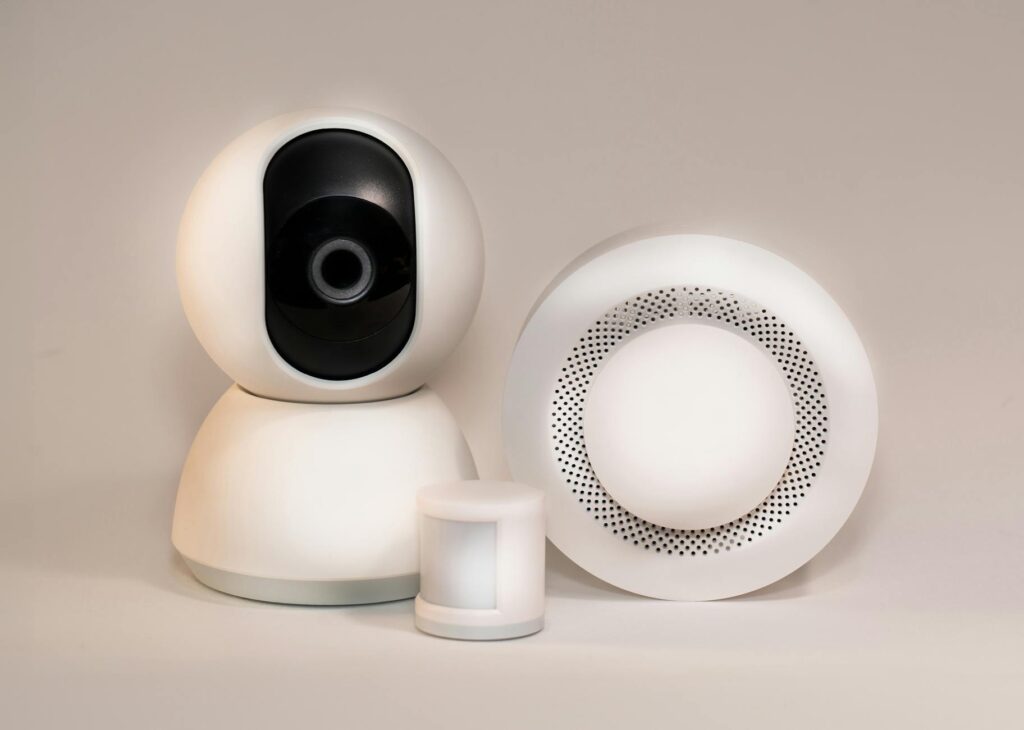
The Ultimate Guide to Smart Home Security Systems in 2026
This guide covers everything about Smart Home Security Systems: Your Ultimate Guide for 2026. As of May 2026, securing your home has never been smarter. Smart home security systems are no longer a luxury but a practical necessity, offering advanced protection, convenience, and peace of mind. But with so many options, how do you choose the right system for your needs? This guide cuts through the noise.
Key Takeaways
- Smart home security systems integrate devices like cameras, sensors, and locks for complete protection.
- Key features to consider include professional monitoring, ease of use, smart home integration, and data privacy.
- DIY systems offer flexibility and lower upfront costs, while professionally installed systems provide convenience and expert setup.
- As of May 2026, AI-powered features like anomaly detection and advanced facial recognition are becoming more common.
- Budget considerations range from under $300 for basic DIY kits to over $1000 for premium professionally installed systems.
Why Upgrade to a Smart Home Security System in 2026?
Traditional alarm systems are a thing of the past. Smart security systems offer a connected, intelligent approach to home protection. They use the power of the internet to provide remote monitoring, instant alerts, and integration with other smart devices. Think of receiving a notification on your phone the moment a door opens unexpectedly, or remotely checking live video feeds from anywhere in the world.
This interconnectedness means your security system can do more than just sound an alarm. It can trigger lights, lock doors, and even alert emergency services, all managed from a single app. According to a survey by Statista as of 2026, over 40% of households planned to adopt at least one smart home device, with security being a top priority.
[IMAGE alt=”Diagram showing interconnected smart home security devices: camera, door sensor, smart lock, alarm, and smartphone app” caption=”A smart home security ecosystem integrates various devices for unified control.”]
Core Components of a Smart Home Security System
Most smart home security systems are built around a few key components that work together to provide complete coverage. Understanding these parts is crucial for selecting a system that meets your specific needs.
Smart Hub or Base Station
This is the brain of your smart security system. It connects to all your sensors, cameras, and other devices, and links to your home’s Wi-Fi to send alerts to your smartphone. It’s the central command center, ensuring all components communicate effectively.
Security Cameras
Indoor and outdoor cameras provide visual monitoring. Modern systems in 2026 often feature high-definition resolution, night vision, motion detection, two-way audio, and even AI-powered facial recognition. Some offer local storage via SD card, while others rely on cloud subscriptions.
Door and Window Sensors
These small, unobtrusive sensors detect when a door or window is opened. They typically consist of two parts that attach to the frame and the opening; when separated, they trigger an alert to the hub.
Motion Detectors
Placed in key areas, motion detectors use infrared or microwave technology to sense movement. Advanced models can differentiate between pets and humans to reduce false alarms. Their placement is critical for effective coverage.
Smart Locks
These replace traditional deadbolts and allow you to lock and unlock your doors remotely via an app. Many also offer features like keyless entry codes for guests and activity logs, enhancing both security and convenience.
Smart Alarm/Siren
A loud siren is essential for deterring intruders and alerting occupants. Smart sirens can be triggered remotely or automatically by sensor activity, often reaching decibel levels of 100 dB or higher.
Choosing Your Smart Home Security System: DIY vs. Professional Installation
One of the biggest decisions is whether to opt for a do-it-yourself (DIY) system or a professionally installed one. Both have distinct advantages and disadvantages.
DIY Smart Security Systems
DIY systems, such as those from SimpliSafe or Ring Alarm, are designed for easy self-installation. They typically involve a central hub and various sensors and cameras that you can place yourself, often without tools. A mobile app usually guids the setup process.
Pros: Lower upfront cost, flexibility to add or move components, no installation fees, often more affordable monthly monitoring fees (or no fees if self-monitored). For instance, a basic Ring Alarm Security Kit starts around $200, with optional professional monitoring for $20/month.
Cons: Requires time and effort to set up, troubleshooting is your responsibility, may not cover complex home layouts as effectively. If you’re comfortable with basic tech and want control over your setup, this is a great option.
[IMAGE alt=”Person easily installing a Ring smart home security sensor on a door frame” caption=”DIY systems focus on user-friendly installation with app guidance.”]
Professionally Installed Systems
Companies like ADT or Vi vint offer complete security solutions where trained technicians install and configure the entire system for you. They often come with dedicated customer support and maintenance services.
Pros: Expert setup ensures optimal placement and functionality, less hassle for the homeowner, often includes integrated professional monitoring, and may come with advanced features or warranties. Vi vint’s systems, for example, can include smart locks, thermostats, and lighting integration as part of a premium package.
Cons: Higher upfront costs due to installation fees, long-term contracts are common, less flexibility to change components without professional assistance. Prices for professional installation can range from $200 to over $1000, plus monthly monitoring fees.
Key Features to Look for in 2026
The smart home security market is constantly evolving. Here are the features that matter most as of May 2026:
Professional Monitoring vs. Self-Monitoring
Professional monitoring means a third-party service is watching your system 24/7. If an alarm is triggered, they will attempt to contact you and, if necessary, dispatch emergency services. Self-monitoring means you receive alerts directly and are responsible for contacting authorities.
While self-monitoring is free, professional monitoring (often $15-$50 per month) adds a significant layer of security. Services like Noonlight can integrate with many DIY systems to offer on-demand professional response for a small fee.
Smart Home Integration
Does the system play well with others? Compatibility with platforms like Amazon Alexa, Google Assistant, or Apple HomeKit allows for voice control and integration with other smart devices. Imagine saying, “Hey Google, arm my security system,” as you leave for work. Companies like Samsung SmartThings offer broad compatibility across many brands.
Camera Capabilities
Look for high-resolution video (1080p or higher), wide-angle lenses, clear night vision, and reliable motion detection. Two-way audio is useful for communicating with visitors or deterring potential intruders. As of 2026, AI features like package detection and person alerts are becoming standard, reducing nuisance notifications.
Battery Backup and Cellular Backup
A power outage or internet disruption shouldn’t disable your security. Ensure the system has a battery backup for the hub and, ideally, cellular backup. Cellular backup allows the system to communicate with monitoring services even if your home internet is down, a feature offered by many professional services and some premium DIY plans.
Data Privacy and Security
With smart devices, data security is paramount. Research the company’s privacy policies, encryption methods, and how they protect your video footage and personal data from breaches. Reputable brands like Arlo and Nest (Google) invest heavily in strong security protocols.
Real-World Use Cases and Examples
Let’s look at how smart home security systems are used in practice:
Scenario 1: The Busy Family
The Miller family, with two young children and dual working parents, uses a Ring Alarm system. They appreciate the ability to arm/disarm the system remotely, check on their pets via indoor cameras, and grant temporary access codes to a trusted neighbor when they’re away. The motion alerts from outdoor cameras also provide peace of mind when kids are playing in the yard.
Scenario 2: The Small Business Owner
Sarah, who runs a small boutique from her home, uses a Vivint system. The system includes multiple indoor cameras for inventory monitoring, a smart lock on the shop entrance with unique access codes for employees, and professional monitoring. This setup allows her to focus on her business, knowing her premises are secure and remotely accessible if needed.
Scenario 3: The Apartment Dweller
For a renter like Alex, a DIY system like Abode is ideal. It’s easy to install and uninstall without damaging property, offers expandable options like glass-break sensors, and can connect to a monitoring service. The flexibility means Alex can take the system when they move to a new apartment.
Common Mistakes to Avoid When Choosing a System
Many users make common missteps that can lead to frustration or inadequate security. Here’s how to steer clear:
Mistake 1: Not Considering Your Internet Connection
Smart security systems rely heavily on Wi-Fi. If your home Wi-Fi is weak or unreliable, especially in certain areas, your system will suffer. Test your Wi-Fi strength throughout your home before buying, or consider a mesh Wi-Fi system like those recommended by Wirecutter in their 2026 reviews.
Solution: Invest in a quality mesh Wi-Fi system, or ensure your chosen security system has strong cellular backup for uninterrupted connectivity.
Mistake 2: Overlooking Monitoring Fees and Contracts
Some systems have hidden monthly fees or long-term contracts that can become expensive. Always read the fine print regarding monitoring, cloud storage, and any other recurring costs.
Solution: Compare the total cost of ownership over 2–3 years, factoring in equipment, installation, and monthly fees. Many DIY systems offer no-contract options.
Mistake 3: Buying Too Many Components Initially
It’s tempting to outfit your entire home with every sensor available. However, starting with the essentials and expanding later is often more practical and cost-effective.
Solution: Begin with a base kit including a hub, a few door/window sensors, and a camera. You can always add more components as you identify specific needs.
Expert Tips for Maximizing Your Smart Home Security
To get the most out of your smart security system, follow these best practices:
- Secure Your Wi-Fi Network: Use a strong, unique password for your Wi-Fi and enable WPA3 encryption if your router supports it.
- Update Firmware Regularly: Keep your hub, cameras, and other devices updated to patch security vulnerabilities. Many systems do this automatically.
- Place Cameras Strategically: Mount outdoor cameras high enough to prevent tampering but low enough to capture faces. Ensure indoor cameras are placed to cover entry points and high-traffic areas.
- Test Your System: Regularly test all sensors, cameras, and the siren to ensure they are functioning correctly. If you have professional monitoring, inform them you are testing your system.
- Use Strong, Unique Passwords: For your security system app and any linked accounts, employ strong, unique passwords and enable two-factor authentication wherever possible.
- Understand Your System’s Limitations: No system is foolproof. Be aware of potential blind spots or vulnerabilities and supplement your system with good old-fashioned common sense, like always locking doors.
Frequently Asked Questions
Can I use a smart home security system without a monthly fee?
Yes, many DIY systems allow for self-monitoring, meaning you receive alerts directly to your phone and are responsible for contacting authorities. You’ll miss out on 24/7 professional oversight, but it’s a cost-effective option for many users.
How do smart home security systems handle power outages?
Most systems include a battery backup for the main hub and sensors, allowing them to function for several hours. Systems with cellular backup can continue to send alerts even if your home internet is down.
Are smart home security systems secure from hackers?
Reputable brands invest heavily in encryption and security protocols. However, like any internet-connected device, they can be vulnerable. Using strong, unique passwords and keeping firmware updated significantly reduces risk.
What is the average cost of a smart home security system?
Costs vary widely. Basic DIY kits can start around $200-$300. Professionally installed systems can range from $500 to $1500 or more upfront, with monthly monitoring fees typically between $15 and $50.
Do I need a smart home hub for a security system?
Many modern smart security systems have integrated hubs within their base station. However, some systems are designed to work with existing smart home hubs like Samsung SmartThings or Amazon Echo, offering more integration flexibility.
Can smart security cameras record without Wi-Fi?
Some cameras can record locally to an SD card even without an internet connection. However, you won’t be able to access live feeds or receive motion alerts remotely until the Wi-Fi is restored.
Conclusion
Choosing the right smart home security system in 2026 involves balancing your budget, desired features, and installation preferences. Whether you opt for a DIY setup or professional installation, a well-chosen system significantly enhances your home’s safety and provides invaluable peace of mind.
Last reviewed: May 2026. Information current as of publication; pricing and product details may change.
Source: Wired
Editorial Note: This article was researched and written by the Bloxtra editorial team. We fact-check our content and update it regularly. For questions or corrections, contact us.